
Pixel art game maker: make a pixel-art game with AI
Tell Shiny Gen what your game is and an AI draws the sprites, builds the levels, writes the code, and tests it. Then play it in a browser or on your phone, and when you want an object to hold, save it as a real Game Boy or GBA ROM.
Starting and playing a pixel game costs nothing. A ROM file of it needs any one purchase, from $2.99.
Pixel art without drawing every pixel
People searching for a pixel art game maker usually want one of two things. Some want an editor to draw sprites in. Others want to end up with a finished, playable game. This page is about the second: a tool that makes the sprites, the levels, and the code together, so what you get is a game and not a folder of loose pictures.
Sprites drawn for you
Ask for a knight, a slime, or a lighthouse and the AI draws the character and its animation frames, in the same style as the rest of the game.
Pixels stay sharp
Small screens are scaled up in whole steps, so console-size sprites stay crisp on a big monitor and on a phone.
Plays anywhere
Open the game in a browser tab, on an iPhone, iPad, or Android phone, or send a friend the link. Nothing to install for them.
You are not locked out of the art either. Ask for changes in plain words, such as a taller hero or a night palette for the forest, and the sprites are redrawn. Tiles, maps, and sound can be edited the same way.
Choose how small your pixels are
Pixel art gets its charm from a small canvas. A tiny screen means each pixel matters, and a short color list makes a game look like one piece. Pick the size that suits the game you have in mind.
| Pixel look | Screen | Colors | Good for |
|---|---|---|---|
| Game Boy Color style | 160 by 144 | Palettes of four colors, eight for sprites and eight for backgrounds | Chunky tiles, small casts, a bold look |
| Game Boy Advance style | 240 by 160 | Banks of 16 colors, up to 128 sprites on screen | Adventures, fighters, richer scenes |
| Free-size 2D on Godot | A size you choose | No console limit on colors | A pixel-art platformer that plays in the browser |
The two console looks are enforced by the engine: art with too many colors is fitted to the palette and the editor previews the result before you build.
From idea to playable pixel game
- Pick a look. In Shiny Gen press +, then New, and choose the look: a Game Boy Color or GBA engine for fixed pixel limits, or Godot for a free-size 2D game.
- Describe the game. Write a line or two: a farmer hopping between garden plots, a knight who dresses up before a forest run. The AI drafts the art, the rules, and the sound.
- Play it right away. The agent runs its own build with a virtual controller and fixes crashes before handing it over, so the first thing you see is a game that starts.
- Polish by chat. Change a sprite, add a boss, make the music faster. Every request edits the same project, so the game keeps growing instead of starting over.
Pixel-art games made with it
These are real games from the free Shiny Gen catalogue. Screens from the console engines are shown at their true small size and scaled up in whole steps.
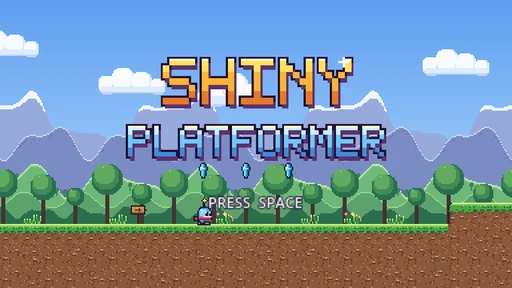 Godot 2D
Shiny Platformer
A side-scrolling platformer with a pixel-art grass world and a title screen.
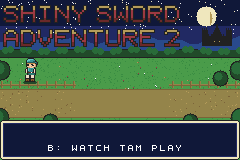 Game Boy Advance
Shiny Sword Adventure 2
A top-down sword adventure with a title screen and a demo you can watch before you play.
- Game Boy Advance
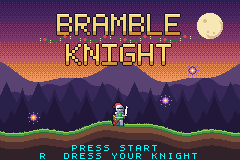
Bramble Knight
A knight crosses a forest at dusk, and you dress the knight before you start.
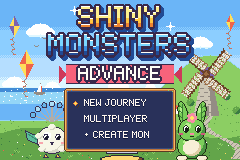 Game Boy Advance
Shiny Monsters Advance
Befriend monsters, win matches, and finish the story at the top of Pinwheel Hill.
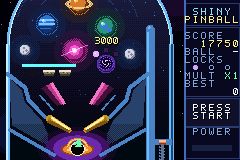 Game Boy Advance
Shiny Pinball
A pinball table with a score, ball locks, and a multiplier.
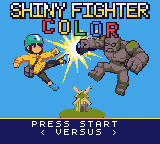 Game Boy Color
Shiny Fighter Color
A versus fighter with eight characters, and a parcel courier among them.
Keep it in the browser, or press it to a ROM
A browser link is the quickest way to share a pixel game: friends tap it and play. A ROM is the other kind of ending. For the Game Boy Color and GBA looks, the engine can save a .gbc or .gba file that opens in an emulator on your computer or phone, or goes on a flash cart's SD card to run on a real handheld.
That second ending is why pixel art games from this tool feel more like objects than uploads. The file belongs to you. The ROM export walkthrough covers save types and emulators, and the GBA guide is a good first read if the handheld look is what you want.
What costs nothing and what does not
Free
Starting a game, playing it in the browser, and sharing the link. Reading and editing the code by hand is free too.
Uses gems
Having the AI draw sprites, write code, and compose. A new account arrives with gems and a handful of free AI turns, and a free prompt follows each day.
Needs a purchase
Saving the game as a ROM file. One purchase of any size, from $2.99, unlocks it for good.
All of the numbers live on the pricing page.
Pixel art game maker questions
What is a pixel art game maker?
A tool for making games whose graphics are built from visible pixels. Some are editors where you draw every sprite yourself, and some, like Shiny Gen, also make the sprites, the levels, and the code from a description.
Do I have to draw the pixel art myself?
No. The AI draws characters, tiles, and animation frames in a consistent style. You can ask for changes in plain words, and you can still draw or adjust art by hand in the project's image editor.
Can I make a pixel-art game on my phone?
Yes. The Shiny Gen app for iPhone, iPad, and Android makes and plays games, and so does a mobile browser. The Android app cannot save a ROM file yet, so use a browser with the same account for that step.
Is there a free pixel art game maker?
Starting, playing, and sharing are free. AI generation draws on the gems that come with a new account plus a free prompt each day. Saving a game as a ROM file is the one step that needs a purchase, from $2.99.
How many colors and sprites can a pixel game have?
On the Game Boy Color engine, palettes of four colors and 40 sprites on screen. On the GBA engine, banks of 16 colors and 128 sprites. The Godot engine has no console cap, so you choose the palette.
Can I turn my pixel-art game into a Game Boy ROM?
Yes, for the Game Boy Color and GBA engines. The export is a .gbc or .gba file that runs in emulators, and in real handhelds through a flash cart, which we have tested for both.
Can I use pixel art I already drew?
Yes. Sprite sheets and maps you add become assets in the game's project, and the agent can use them by name. On the console engines they are fitted to the machine's palettes.
Make a game that looks like it came off a cartridge
Describe the game, pick a pixel size, and have something playable in about a minute.